

If you’ve built a listing campaign in Meta Ads Manager lately, you’ve seen the question: “Are your ads about housing?” It sounds like a formality. It isn’t. The answer you give changes your real estate Facebook ads targeting: who you can reach, how precisely you can reach them, and sometimes whether your ad runs at all.
Let’s be honest: Ads Manager is confusing. Between campaign objectives, audience settings, special categories, verification checks and cryptic error codes, many agents either give up or spend money on ads that never reach the right buyers.
The quick answer: if your agency is in Australia and your ads only reach people in Australia, Meta does not require the Housing Special Ad Category. You can leave it unticked and keep postcode targeting, small radiuses and age ranges. Tick it, and those options go.
This guide explains the rule, what targeting you lose in the Housing category, the easy way to run listing ads with Dripflow, and the full do-it-yourself setup in Ads Manager if you’d rather go it alone.
What is Meta’s Housing Special Ad Category?
Meta groups ads about housing, employment, financial products and services, and social issues into “Special Ad Categories”. Its Discriminatory Practices policy puts extra rules on the first three so they can’t be used to exclude people by age, gender, location or similar traits.
According to Meta’s Business Help Centre, housing ads include:
- Sale, rental or temporary housing listings
- Homeowners, renters and mortgage insurance offers
- Financing options, including mortgage loans
- Home equity or appraisal services
- Real estate and house hunting services
So nearly everything an agency advertises, from a Just Listed post to an appraisal offer, sits inside the definition.
Does the Housing category apply in Australia?
Meta says you must choose the Housing category if:
- you’re an advertiser in the United States, or
- your ads reach people in the United States, Canada or Europe.
Australia isn’t on that list. An Australian agency advertising to Australian audiences is not required to run its listing ads in the Housing category.
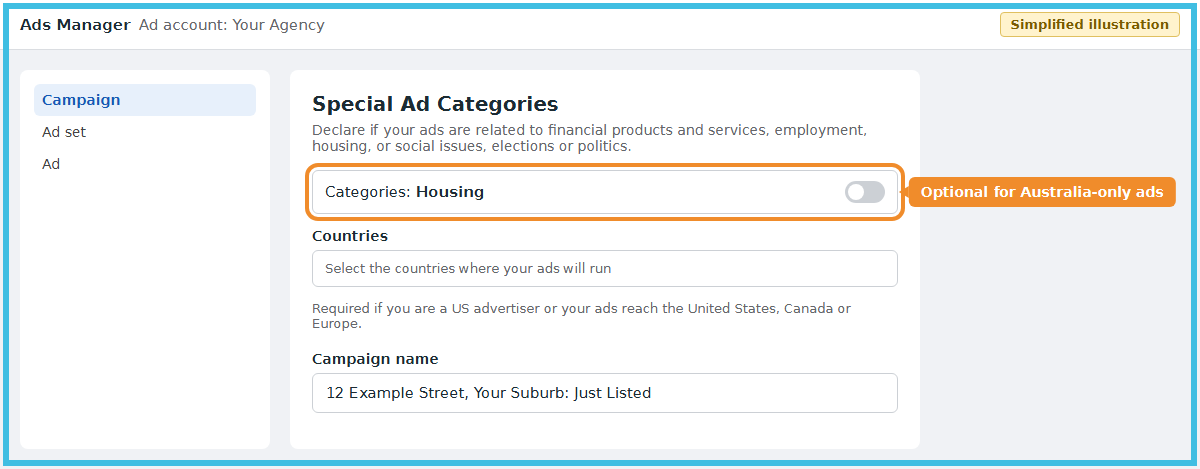
There’s a catch. Meta’s Marketing API documentation says advertisers outside those regions must still answer the Special Ad Category question, but can choose to opt in or out of the audience restrictions. In Ads Manager that is the category question at the start of every campaign. If you tick Housing, the restrictions apply to your campaign even though you’re in Australia.
Two things are worth keeping in mind:
- Meta’s rules change. Check the help page above before each big campaign. If Meta extends the requirement to Australia, the targeting limits below become compulsory.
- Opting out doesn’t mean anything goes. Meta’s advertising standards against discrimination still apply to every ad, and so do Australia’s federal and state anti-discrimination laws, which cover housing and accommodation. Don’t build an audience that excludes people based on protected traits, even if the tool would let you.
Is your agency a US advertiser, or does your ad reach people in the US, Canada or Europe?
Yes
Housing is compulsory
Tick Housing. Age is fixed at 18 to 65+, all genders, no postcode targeting, and a minimum radius of 25 km.
No, Australia only
Housing is optional
You still answer the question, but you can leave Housing unticked and keep normal targeting such as postcodes and smaller radiuses.
Either way, Meta's standards and Australia's anti-discrimination laws still apply. Meta's rules change, so check before each big campaign.
Facebook ads targeting for real estate: what the Housing category removes
If you select Housing (or one day have to), Meta’s documentation lists these limits:
- Age is fixed at 18 to 65+. You can’t target, say, 25 to 40 year old first home buyers.
- Gender must include all genders.
- Location must cover at least a 25 km (15 mile) radius around any city, address or dropped pin. Postcode, neighbourhood and metro area targeting aren’t available, and you can’t exclude locations.
- Detailed targeting loses all demographic and behaviour options. Interests are limited to an approved list, and you can’t exclude anyone by interest.
- Lookalike audiences aren’t available at all.
- Saved audiences aren’t available either.
What you keep: custom audiences, such as a list from your own database, can still be used if Meta accepts the list for Special Ad Category campaigns, and Advantage+ audience still works.
For a suburban agency that’s a big change. A 25 km circle around a Parramatta listing covers a large slice of western Sydney. If you only want to reach people near one suburb, the Housing category makes that hard.
Tip: if you’re advertising only to Australians and you’ve ticked Housing out of caution, you may be giving away precision you’re allowed to use. If your campaigns also reach the US, Canada or Europe (for example ads aimed at expats or overseas investors), you must use the category.
The easy way: let Dripflow run your listing ads
Ads Manager is a big part of why agents struggle with Facebook advertising. It’s built for every kind of business, not for real estate, so agents have to work out objectives, audiences, placements and rules on their own for every listing.
Dripflow is built for Australian real estate agencies and connects to your agency’s CRM. When you publish a listing in your CRM, Dripflow takes care of the rest:
- Automatic listing posts. Every new listing, price change, open home and SOLD is turned into on-brand creative and posted to Facebook and Instagram.
- Automatic boosting of listings. Set a rule once and listings are boosted as ads automatically, targeted around the property’s address, without building a campaign in Ads Manager each time.
- Listing lead ads. Capture buyer enquiries on a specific listing straight from Facebook and Instagram.
- Custom lead ads. Run lead ads for your own offers, such as appraisals or rental management.
- Lead magnet campaigns. Offer something useful, like a suburb report or a seller’s guide, in exchange for contact details to grow your database.
- Connected to your CRM. Listings flow in from your agency’s CRM, so there’s no double entry.
No wrestling with audience settings, no guessing which box to tick. You keep selling, and your listings keep getting seen. See how automatic boosting and lead ads work.
With Dripflow
Set up once, connected to your agency's CRM
- Publish the listing in your CRM
- Select Dripflow as a portal
- Your listing posts and boosts automatically
No Ads Manager needed
Doing it yourself in Ads Manager
Repeat for every listing
- Check your Page and ad account
- Create a campaign and pick an objective
- Answer the Special Ad Category question
- Set the budget and schedule
- Build the audience
- Choose placements
- Add the creative
- Add the link and UTM tracking
- Review and publish
Let Dripflow run your listing posts, boosts and lead ads automatically. Try Dripflow free for 14 days
Prefer to do it yourself? Set up a listing ad in Ads Manager
Here’s a simple setup for one listing or a set of listings. Menu names shift from time to time, but the flow is the same. The Ads Manager images below are simplified illustrations, not screenshots.
Step 1: Check your Page and ad account
Make sure your agency Facebook Page is connected to a Business portfolio and ad account, and that you have admin access.
Step 2: Create a campaign and choose an objective
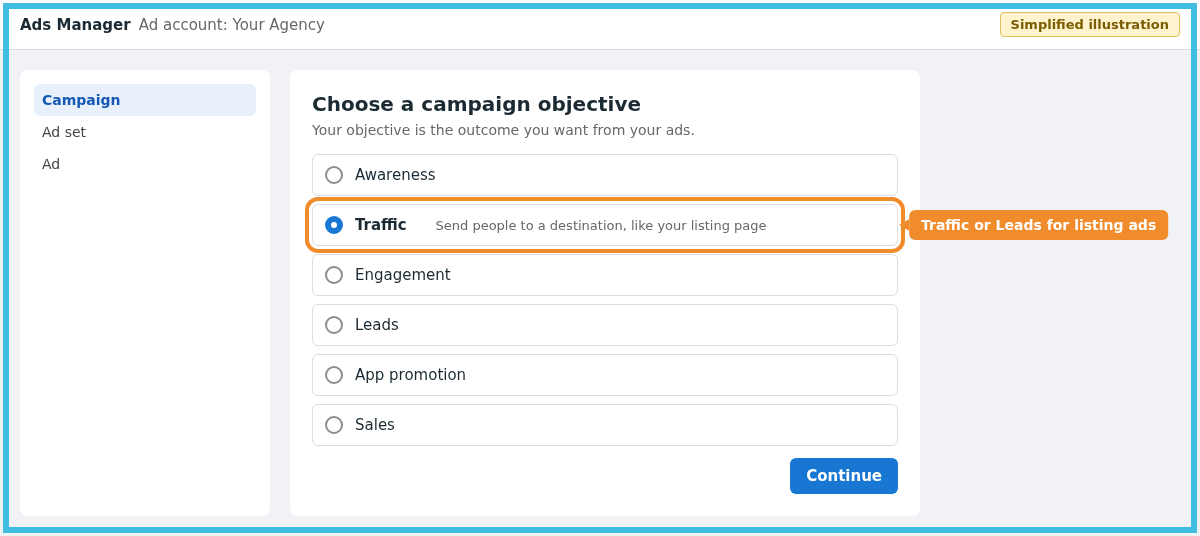
In Ads Manager, click Create. For most listing ads, choose Traffic (clicks to the listing page) or Leads (an enquiry form inside Facebook). Choose Awareness for brand or “Just Sold” campaigns.
Step 3: Answer the Special Ad Category question
If your audience is in Australia only, you can leave Housing unticked. If you’ll reach the US, Canada or Europe, tick Housing and select the countries.
Step 4: Name the advertiser and set the budget
In the ad set, look for Ad transparency. Meta now asks many Australian ad accounts to name a verified advertiser before it will show ads to people in Australia, and without one the ad is refused with error #3858634. Our guide shows how to verify your advertiser and fix the “Advertiser is missing” error.
Then set the budget and schedule. A short burst of 7 to 14 days around launch and the first open home suits most listings.
Step 5: Build the audience
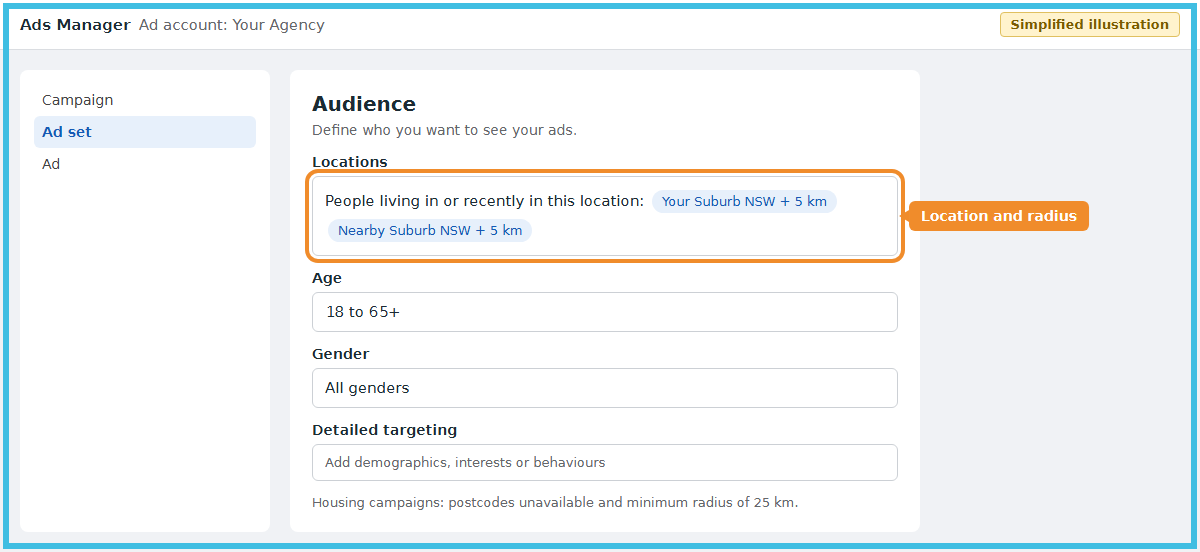
Set the location around the property and nearby buyer suburbs. Without the Housing category you can use postcodes or a smaller radius. Keep the audience broad on age and interests, and let Meta’s delivery find buyers. Location stays a hard limit even with Advantage+ audience switched on.
Step 6: Choose placements
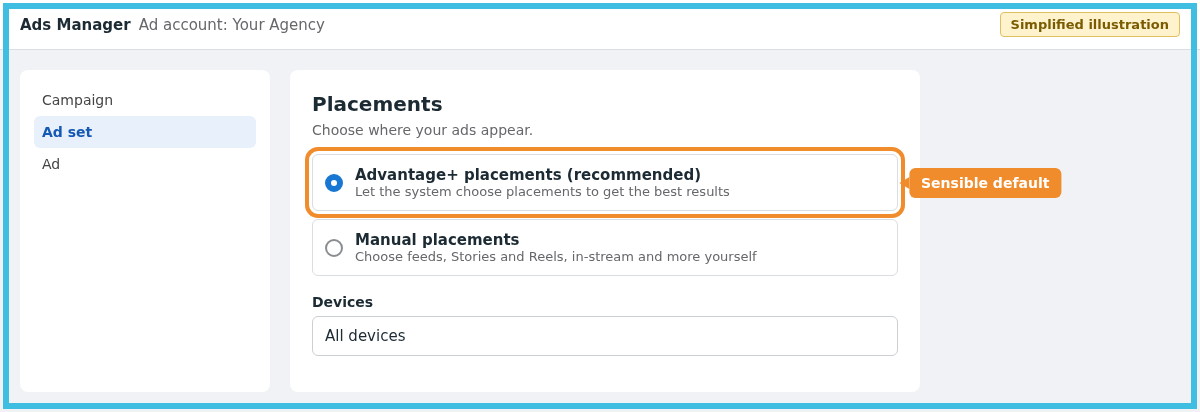
Advantage+ placements is a sensible default. Make sure your creative works in square (feed) and vertical (Stories and Reels) formats.
Step 7: Add the creative
Use the best 3 to 6 photos as a carousel, or a short video walkthrough. Put the address, price guide or method of sale, and open home times in the copy. If you quote a price, the underquoting rules apply to your ads too: see our guides to Victoria’s Property Price Statement and the NSW underquoting laws.
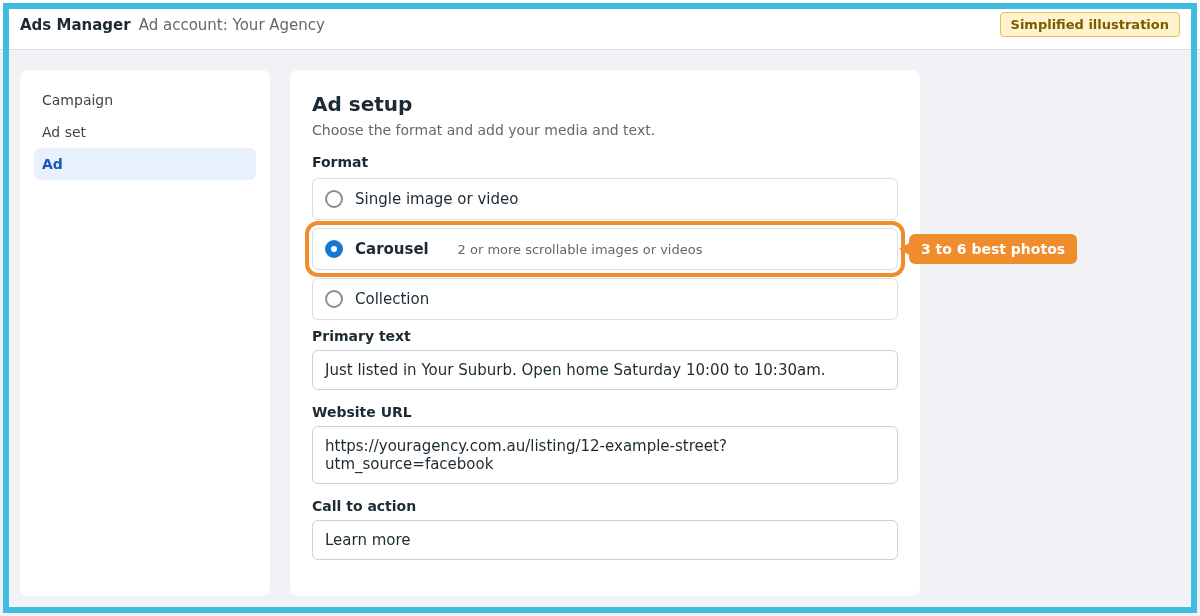
Step 8: Add the link and tracking
Link to the listing page on your agency website, not a portal, so you capture the enquiry. Add UTM tags so you can see results in Google Analytics.
Step 9: Review and publish
Read the copy aloud for anything that could sound like it favours or excludes a type of buyer, then publish.
Listing ads that still work under the rules
Whether or not you use the Housing category, these formats do well because the creative does the targeting:
- Just Listed carousels. Lead with the hero photo, then the kitchen, living area and outdoor space. Put the suburb in the first line of the copy so locals stop scrolling.
- Open home reminders. Run a small budget for 2 to 3 days before each open, with the time and address in the image.
- Price change posts. An “Updated price guide” post reaches buyers who looked earlier and passed.
- Just Sold proof. Sold posts show vendors in the area that your agency gets results, which builds your appraisal pipeline.
- Short video walkthroughs. Even 20 seconds filmed on a phone works well in Reels and Stories.
Clear, local creative matters more as targeting gets broader. If you can’t tell Meta to show an ad only to people in one postcode, the copy and the images need to make locals stop scrolling.
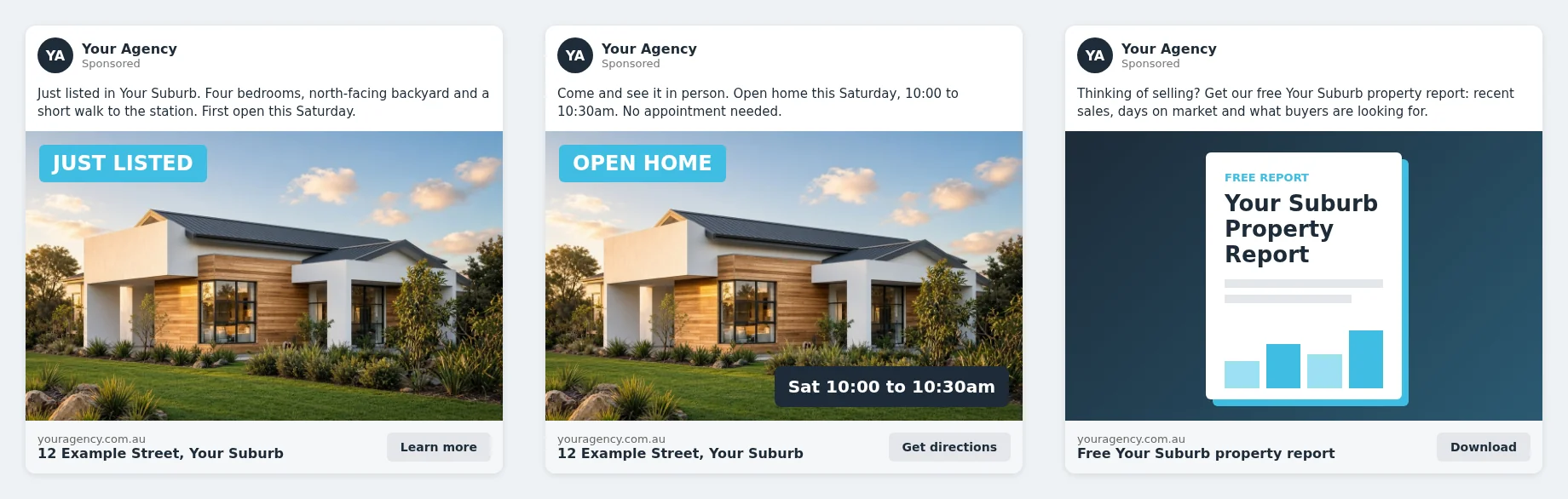
Example ads: Just Listed, Open Home and a lead magnet (free suburb report).
Common errors and how to fix them
Error #3858634: “Advertiser is missing”
Agents running property ads in Australia have been seeing this when Meta asks them to name who is paying for and benefiting from the ad. It isn’t a targeting problem, and changing the audience or the category won’t fix it. Follow our step-by-step fix for error #3858634.
Your ad is flagged as housing or rejected
Meta sometimes flags a property ad that was set up without the category. If your audience is only in Australia, check the campaign’s Special Ad Category setting and the countries in your audience. If any audience country requires the category, edit the campaign to select Housing, or remove that country.
Audience options are greyed out
If postcodes, age ranges or interests are greyed out, the campaign is in the Housing category. Either accept the limits or, if you’re advertising only in Australia, create a new campaign without it. You can’t always change the category after a campaign has been published, so it’s often faster to duplicate and rebuild.
Saved or lookalike audiences won’t load
Saved and lookalike audiences aren’t available in a Housing campaign. Use a custom audience or location targeting instead, or run the campaign without the category if your audience is only in Australia.
Ads stuck “In review”
Most reviews finish within a day. Long delays often follow a big edit or a new ad account. Avoid making repeated edits while an ad is in review.
Does this sound a bit difficult? Use Dripflow instead
If that felt like a lot, you’re not alone. Category questions, greyed-out audience options, verification errors and review delays are exactly why so many agents give up on paid ads. Dripflow posts and boosts your listings for you, connected to your agency’s CRM.
Fresh, local, well-designed listing ads without touching Ads Manager. Try Dripflow free for 14 days
Frequently asked questions
Do Australian real estate agents have to use Meta’s Housing Special Ad Category?
Not as of November 2026. Meta requires it for US advertisers and for ads reaching the US, Canada or Europe. Australian advertisers reaching Australian audiences can choose whether to opt in.
What happens if I tick Housing anyway?
The restrictions apply: age fixed at 18 to 65+, all genders, no postcode targeting, a minimum 25 km radius around a city or address, no lookalike or saved audiences, and no demographic or behaviour targeting.
Can I target by postcode in Facebook ads for real estate?
Yes, if your campaign isn’t in the Housing category. Postcode targeting isn’t available in Housing campaigns.
How do I fix error #3858634?
It’s Meta’s advertiser verification check, not a targeting problem. Follow our step-by-step fix.
Can Dripflow run my listing ads for me?
Yes. Dripflow connects to your agency’s CRM and can automatically boost listings and run listing lead ads, custom lead ads and lead magnet campaigns. Try it free for 14 days.
What’s the best Facebook ad for a property listing?
A photo carousel or short video linking to the listing on your own website, with the suburb, price guide and open home times in the copy.
Sources: Meta Business Help Centre: About ads for housing; Meta for Developers: Special Ad Categories; Meta Business Help Centre: Audiences for Special Ad Categories. Checked 2 November 2026.